Blupointe's partnership with Omega Technologies enables our software to be installed in almost any environment, physical server, virtual server to back up locally to any hard disk, private cloud local or remote, or offsite data center. It provides security and data integrity by encrypting the data during transit and while in the customer's vault, and gives customers instant access from anywhere along with full reporting. Also included are e-mail message-level archiving, and the ability to work with most common applications such as Exchange, SQL, SharePoint, and Oracle for open file backups.
Omega Technologies serves the SMB market and specializes in two vertical markets that are sensitive to data integrity and security, healthcare and municipal government. Two sectors that can not afford to gamble with security, availability, difficulty, reliability and the other headaches that come naturally to Information technology. We sought out the answers to the most common and EXPENSIVE questions the market faces and eliminated those concerns using the BluPointe Technology in our SAS 70 an HIIPA certified data centers.
While Omega Technologies has a strategic alliance with other vendors due to the nature of business continuity and disaster recovery we cant think of another partner more important to provide our clients with the peace of mind and security from the unknown. For more information on Omega Technologies Visit www.omegatechllc.com. We provide simple to complex computer support, network support and services to the Marianna Florida market including Dothan Alabama, Panama City Florida and Bainbridge Georgia areas.
Sunday, March 27, 2011


Monday, March 14, 2011
5 INEXPENSIVE WAYS TO SPEED UP YOUR COMPUTER!!!
Many people today, even in this economy, consider computers to almost be disposable. Others however are compelled to get the most bang for their buck and try to get the most out of their investment. This is one of the most popular questions I am repeatedly asked about. If you are just price conscious, shopping / living on a budget, or just want to get a little bit more out of your computer before replacing it with one of today’s blazing fast machines. All computers slow down after a while, popups begin and programs move ever more slowly. Here are the top 5 things that you can do to speed your computer up. Some are even free.
1. Take the unnecessary programs out of startup. Every software company thinks they have the corner on their particular product and want it in your face constantly so at the time of installation you have an option to start the program in memory or not. Most people want to just install the program they downloaded or purchased and get busy using it, often times missing the option to either start or not start the program at boot time. Next reboot brings an incrementally slower boot time and overall resources are degraded with every new installed program that starts when the computer boots. You can see where this is going. If you don’t manage your boot environment you give up control of valuable resources. Here is how to recover those resources.
First click Start, then click run, in the run box type ‘msconfig’ without quotes and click ‘ok’. Once you do that you should see a new window pop up and have a number of tabs lining the top in a row. Towards the right end you should see the tab labled Startup. Click it. You may have a few or all of the selections checked and it is safe to remove them all or only the ones you want. Some like antivirus may be left there for security sake but can be safely removed. Then click Apply and then ok. At this point when you restart your computer you should notice a faster boot time and a revitalized performance.
2. Remove temporary files. Temporary files are there to serve a purpose but if you are not doing anything at the time then any temp file should be safe to remove. I use a program called CCleaner. It is powerful and simple. There are some advanced features in there that you should have guidance or KNOW what you are doing but the simple task of cleaning useless temp files is one click easy. www.ccleaner.com
3. Scan for spyware and virus’. These programs can bring any machine to a grinding halt performing all sorts of heinous activities on unsuspecting friends, family and other contacts. Most new computers and the refurbished computers usually come preinstalled with some sort of protection, ranging from free antivirus protection to paid internet security suites. None of the above is worth a dime if you don’t use it however. There is a shift in the way antivirus and other security products are being delivered (towards the cloud) and will be the preferred method in the very near future. For as little as $4 per computer per month you can be protected by enterprise grade security software. We have been very happy and successful with ours. Free versions of security software updates typically are delayed so that the paid subscribers get priority updates. You risk becoming infected using the free versions in other words. Security@twoeggtechs.com
4. Add RAM. This is the first step that requires laying down cash. Ram is pretty inexpensive for some of the newer generations of ram but just as with everything else as the demand for the older ram goes up so does the price. Supply and demand. What are you gonna do? You should be able to get some good speed though for about $50.00 on ebay.com or newegg.com
5. Upgrade your hard drive. Any good technician today can have a new hard drive in your computer and looking exactly like it did when you shut your computer off last time. A hard drive is the device that holds all of your data and system files. Using a process called imaging we (any good technician) have the ability to take a snapshot of your old hard drive and move it over to the new drive and have everything look exactly the same with no loss of data in just a couple hours. It is usually a good idea to complete steps 4 and 5 at the same time.
These are the best five ways to really get the most out of that old beast and can all be done usually for less than $200. There ARE other ways but by following these 5 tips you can keep your computer optimized and out of the repair shop.
This article submitted by Jason Johnson, owner of Omega Technologies, Jackson County Florida. Jason blogs at msp360.blogspot.com. He can be reached at jason@omegatechllc.com.
Many people today, even in this economy, consider computers to almost be disposable. Others however are compelled to get the most bang for their buck and try to get the most out of their investment. This is one of the most popular questions I am repeatedly asked about. If you are just price conscious, shopping / living on a budget, or just want to get a little bit more out of your computer before replacing it with one of today’s blazing fast machines. All computers slow down after a while, popups begin and programs move ever more slowly. Here are the top 5 things that you can do to speed your computer up. Some are even free.
1. Take the unnecessary programs out of startup. Every software company thinks they have the corner on their particular product and want it in your face constantly so at the time of installation you have an option to start the program in memory or not. Most people want to just install the program they downloaded or purchased and get busy using it, often times missing the option to either start or not start the program at boot time. Next reboot brings an incrementally slower boot time and overall resources are degraded with every new installed program that starts when the computer boots. You can see where this is going. If you don’t manage your boot environment you give up control of valuable resources. Here is how to recover those resources.
First click Start, then click run, in the run box type ‘msconfig’ without quotes and click ‘ok’. Once you do that you should see a new window pop up and have a number of tabs lining the top in a row. Towards the right end you should see the tab labled Startup. Click it. You may have a few or all of the selections checked and it is safe to remove them all or only the ones you want. Some like antivirus may be left there for security sake but can be safely removed. Then click Apply and then ok. At this point when you restart your computer you should notice a faster boot time and a revitalized performance.
2. Remove temporary files. Temporary files are there to serve a purpose but if you are not doing anything at the time then any temp file should be safe to remove. I use a program called CCleaner. It is powerful and simple. There are some advanced features in there that you should have guidance or KNOW what you are doing but the simple task of cleaning useless temp files is one click easy. www.ccleaner.com
3. Scan for spyware and virus’. These programs can bring any machine to a grinding halt performing all sorts of heinous activities on unsuspecting friends, family and other contacts. Most new computers and the refurbished computers usually come preinstalled with some sort of protection, ranging from free antivirus protection to paid internet security suites. None of the above is worth a dime if you don’t use it however. There is a shift in the way antivirus and other security products are being delivered (towards the cloud) and will be the preferred method in the very near future. For as little as $4 per computer per month you can be protected by enterprise grade security software. We have been very happy and successful with ours. Free versions of security software updates typically are delayed so that the paid subscribers get priority updates. You risk becoming infected using the free versions in other words. Security@twoeggtechs.com
4. Add RAM. This is the first step that requires laying down cash. Ram is pretty inexpensive for some of the newer generations of ram but just as with everything else as the demand for the older ram goes up so does the price. Supply and demand. What are you gonna do? You should be able to get some good speed though for about $50.00 on ebay.com or newegg.com
5. Upgrade your hard drive. Any good technician today can have a new hard drive in your computer and looking exactly like it did when you shut your computer off last time. A hard drive is the device that holds all of your data and system files. Using a process called imaging we (any good technician) have the ability to take a snapshot of your old hard drive and move it over to the new drive and have everything look exactly the same with no loss of data in just a couple hours. It is usually a good idea to complete steps 4 and 5 at the same time.
These are the best five ways to really get the most out of that old beast and can all be done usually for less than $200. There ARE other ways but by following these 5 tips you can keep your computer optimized and out of the repair shop.
This article submitted by Jason Johnson, owner of Omega Technologies, Jackson County Florida. Jason blogs at msp360.blogspot.com. He can be reached at jason@omegatechllc.com.
Thursday, January 20, 2011
F-BOMB Facebook Bomb Surprise!!
It's not REALLY a bomb but it can have devastating effects none the less. There is a new facebook virus that entices trusted friends to click a link that downloads and installs a trojan virus without your knowledge. Likde others that read like, "look at this video of you doing that stupid thing" "hey, this is cool, check it out" or other sneaky lines we've all seen.
This particular virus is pretty bad because it is a spam machine, and it collects email contacts as well as facebook contacts AND LOGIN information to both. Once you click the link it takes you to this page:

This particular virus is pretty bad because it is a spam machine, and it collects email contacts as well as facebook contacts AND LOGIN information to both. Once you click the link it takes you to this page:
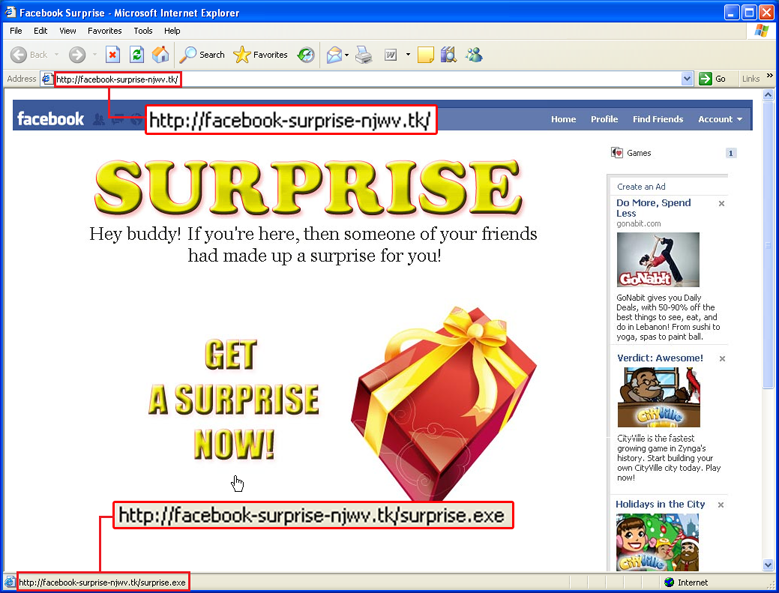
When you download the executable it downloads and installs itself in the background. Once the file “surprise.exe” is executed, it will then monitor all user activity, by injecting itself to the active browser, such as Internet Explorer or Mozilla Firefox. If the user tries to login into his Facebook account, the malware will record the username and password, to be used to spamming to every friend on the Facebook account. Users can find out by looking at the folder “sent”.
This is a recently released virus with the earliest infections documented Jan 18, 2011 that we can find.
Most free antivirus products will not detect this virus for 10 to 14 days as they generally allow paid subscribers to update first and delay the free versions. We are ready and waiting to assist you in removal of this and all other trojans you may have. Of course we dont stop there we help you patch the holes that allow this type of infection.
Contact us:
Panama City @ 850-387-0103, Marianna @ 850-272-0943
Skype - jasonjohnson0 Online form
Tuesday, December 21, 2010
Can the Tax Man be Santa?
Even this late in the year I speak with people trying to spend money to avoid the tax penalty. Most are spending on office supplies and other consumables rather than investing in resources that are used daily that are not consumable recycleable. HARDWARE. SOFTWARE. LEASED EQUIPMENT. These assets are what will increase productivity through increased speed, increased sucurity preventing lose of downtime due to viruses, cyber attacks or other malicious software. Every business owner should be taking advantage of this tax deduction this year. Dont wait. The tax code I am telling you about is Section 179 of the IRS tax code. It essentially says anything you buy or lease in 2010 is 100% tax deductable if it is under $500,000 including computer equipment, software, or vehicles. These items wont be stolen like pens, or thrown away like sticky notes. Below is more information on Section 179. If you want or need anymore iformation feel free to contact us @ (850)272-0943 or online @ http://www.omegatechllc.com/
Essentially, Section 179 of the IRS tax code allows businesses to deduct the full purchase price of qualifying equipment purchased or financed during the tax year. That means that if you buy (or lease) a piece of qualifying equipment, you can deduct the FULL PURCHASE PRICE from your gross income. It's an incentive created by the U.S. Government to encourage businesses to buy equipment and invest in themselves. It is sometimes referred to as the "SUV Tax Loophole" or the "Hummer Deduction" because many businesses have used this tax code to purchase qualifying vehicles (like SUV's and Hummers.)
Essentially, Section 179 works like this:
Essentially, Section 179 works like this:
When your business buys certain pieces of equipment, it typically gets to write them off a little at a time through depreciation. In other words, if your company spends $50,000 on a vehicle, it gets to write off (say) $10,000 a year for five years (these numbers are only meant to give you an example.)
Now, while it's true that this is better than no write off at all, most business owners would really prefer to write off the entire equipment purchase price for the year they buy it.
In fact, if a business could write off the entire amount, they might add more equipment this year instead of waiting. That's the whole purpose behind Section 179… to motivate the American economy (and your business) to move in a positive direction. For most small businesses (adding total equipment, software, and vehicles totaling less than $500,000 in 2010), the entire cost can be written-off on the 2010 tax return.
Now, while it's true that this is better than no write off at all, most business owners would really prefer to write off the entire equipment purchase price for the year they buy it.
In fact, if a business could write off the entire amount, they might add more equipment this year instead of waiting. That's the whole purpose behind Section 179… to motivate the American economy (and your business) to move in a positive direction. For most small businesses (adding total equipment, software, and vehicles totaling less than $500,000 in 2010), the entire cost can be written-off on the 2010 tax return.
For businesses adding even more than $500,000, the write-offs are still substantial. See the following graphic for an example of the savings that is currently available to you after the 'Small Business Jobs and Credit Act of 2010' passed in September 2010.
Thursday, December 16, 2010
Give the Gift this Christmas
In a time when companies are shunning the traditions and heritage that made this country what it is Omega Technologies is celebrating. The Gift of giving. Christ gave His life for us and he left us with a few commandments; Do unto others.... Visit the children and widows.... and feed the hungry. This Christmas we are helping feed the hungry. We are looking for new friends and customers for 2011 and we thought there is no better way to make friends than to give a gift so we propose to give all we can. Here is that plan:
For every new business customer that contacts us in the last few days before Christmas and asks us to do a network audit usually priced around $300 and asks we will provide the audit for $25. We will also donate 25lbs of food to Chipola Family Ministries in Marianna Fl. in their name. CFM feeds approximately 13000 people per year and like all businesses, charities and organizations times are tough. This also fits our mission and culture well because we are all about providing solutions to those in need. We just EXCEL at technology above the competition.
The audit we will complete will be a comprehensive audit of all aspects of your network, provide a list of security issues that need to be addressed and the way to address them. We will provide reports as a baseline to give you some idea of where you are and where you need to be. After that there will be no further requirements. You are not required to buy anything, ever. We aren't high pressure sales we provide you with all of the information we can to let you make a decision. If you would like a follow up visit then we would be happy to present you with other options at that time. Our short term gaol is to feed those who would not otherwise have a GOOD MEAL for Christmas with a gift from the heart and lend a little support to an organization like Chipola Family Ministries that works at this year round at a time when they need it the most. Help us do that. If you are in Marianna (850) 272-0943, Panama City, (850) 387-0103, Tallahassee (850) 583-0223. Surrounding areas (850) 272-0943. Or email us @ info@omegatechllc.com
Edit:
In order to get credit for giving the meals we must have to money on or before Dec 23. The credit will be wholly the company receiving the free audit and Omega Technologies will never be mentioned. If you wish we can include a card saying Merry Christmas from...."Company Names" Of course that is optional.
Monday, November 29, 2010
The "Nightmare" before Christmas virus
Microsoft is investigating reports of an unpatched vulnerability in the Windows kernel that could be used by attackers to sidestep an important operating system security measure. One security firm dubbed the bug a potential "nightmare," but Microsoft downplayed the threat by reminding users that hackers would need a second exploit to launch remote attacks.
This is how one report began in an informational release of a proof of concept strategy to help attackers bypass the security of Windows Vista and Windows 7 that prevents unauthorized users install unauthorized software. It (UAC Security) was also designed to make it very difficult or impossible for malware to be remotely installed. with this new exploit it make User Access Controls useless.
Microsoft is aware of the issue but is considering waiting to patch the hole. Microsoft's Jerry Bryant says they are still researching and investigating the issue and will take appropriate measures. Thier concern seems to be dampened by the fact that the code by itself is not enough to comprimise a computer or server, it requires them to be able to install malware on a computer already.
Because the exploit allows remote users to assume elevated or administrator privileges any machine on a network can become a host for distribution of anytype of virus or malware, botnets, and rootkits. Therefore it has been appropriately dubbed "nightmare"
This threat is far from over as it doesn't appear that Microsoft will wait to patch this flaw in its Kernel until Patch Tuesday, December 14 2010. As of the time of this writing there are no updates that relate to this flaw.
You can however make sure to always patch your system using Microsofts Automatic Updates, update you antivirus and spyware solutions and scan frequently. Ensure you know what links you are clicing in strange emails from your contacts and facebook friends and the other common knowledge practices all for free.
If this isnt enough for you. If you are experiencing popups, malware, slow pc startup, network lag or delay, unusual redirected pages, unsure of your level of protection and just want a free checkup email us at info@omegatechllc.com. Omega Technologies offers different plans from one time service to unlimited monthly service starting as low as $14 per month. Our TDC360 (Total Desktop Care 360) are already covered and at peace.
Saturday, November 27, 2010
Introduction - Omega Technologies and Omega 360
Omega Technologies was founded in 2003 as a break / fix company serving the Jackson County Fl. market. Since then the company has undergone partnership, merger, restructure and the recession. As we continue to serve and grow we find ourselves evolving again to meet the needs of our clients as they must find ways to do more with less. The last seven years have been exciting but somehow I think we have just scratched the surface of where this company is going because of the extraordinary contacts we have made and clients we have served. As we near the end the first decade of this century and the millennium you have to consider where will we go from here?
In 2011 Omega Technologies will release to the public an even better way to deliver IT services. For years the world has been promissed faster, better, cheaper, and automated by the technology sector and IT firms. In the early turn of the century and millennium we began to see some things cobbled together that were able to deliver some of the promised features but they were very expensive and cumbersome, slow to deliver and had no real reporting to ensure the task(s) had completed with any regularity or certainty. Those were the days when IT departments had teams of people. Those were also the days when IT departments fought to keep automation out because they felt like it would replace them. Things progressed in the realm of client support and desktop / server management based on standards and now delivery of valuable IT server are available to the small to medium business markets. Not only is it available it is relevant across the spectrum of business.
As costs have risen and profits shrunk over time and especially in this time of recession it has become necessary for some to make cuts to staff, including IT staff, or add duties and responsibilities to office staff who are already over burdened and busy with tasks that actually produce revenue rather than supporting technology. Many times as these people are saddled with the responsibility of the network or the desktop maintenance the person supporting it needs to learn more about what they are doing requiring research keeping them from regular duties. This puts undue stress on the office and reduces the value of the bottom line.
Consider this, if you already have an outsourced solution or provider were you satisfied with the results you saw in the quarterly business review? Did the critical Microsoft patches look complete? Were you able to see the traffic across your network and how it was being utilized? If you are not seeing this information you are missing critical data. It is easily categorized and summarized into reports the average human can understand.
As we have spent time with our clients getting to know their needs individually we find that this is a good example of most offices, probably yours as well, but there are just some things that take TOO much time. Therefore we have developed Omega 360. Omega 360 is the future of Service delivery of Information Technology. We have broken up all of our business services in order to provide you only the parts you need. Whatever you have covered in house and can maintain you keep, whatever you determine should be handled as a hosted or outsourced service we can fill the gap. Imagine a pie chat with 75% of the services covered in house, we seamlessly provide the rest through our Omega 360 technology. If you need network support and Microsoft patch management and nothing more, we provide that and that is 360. If you have everything covered except encrypted email for HIPAA compliance, we can fill that slot for you. That is 360. Gateway Network Defence, Managed Security, Managed Antivirus, Managed Endpoint Security, Remote Desktop Support, Server Watch, Remote Server Care, Proactive Server Care, Total Desktop Care, and Virtual Service Desk when you need it, and how you need it. Any part or all of that is Omega 360.
As 2011 approaches we hope to begin the new decade with our business values of last decade, like honesty, integrity, trust and knowledge, and the new 360 Technology services of the future. We share this new vision with you so that you know you can have a partner in business that is as concerned about your business as our own. We will continue to provide you with the best technology available to us to maintain 100% uptime and remedy situations that cause downtime before it happens.
In the month of December we will be running an introductory offer to the first ten companies that take advantage of this service. We will complete a free network audit, and per machine diagnostic to determine the state of your network. Free Omega 360 Remote Support with Client Communicator (a $299 value alone). We will offer the Omega 360 Total Desktop Care Plus for $99 per month up to 10 workstations. This offer will expire December 31, 2010. You must get registered now for this service in order to take advantage of this offer.
Contact us at sales@omegatechllc.com or by phone in
Panama City @ 850-387-0103, Marianna @ 850-272-0943.
Subscribe to:
Posts (Atom)

 Posts
Posts

